Iphone 13 Pro Max pictures are white when viewing
After I took some photos with my phone my photos got white and I can’t see them anymore.
I restarted my phone many times but my photos didn’t show up .
iPhone 13 Pro Max
After I took some photos with my phone my photos got white and I can’t see them anymore.
I restarted my phone many times but my photos didn’t show up .
iPhone 13 Pro Max
Hey SQ_1234,
Thanks for participating in Apple Support Communities. To be sure we understand, do all of your photos appear this way or only the new photos that you take with your iPhone? If it's all photos, do you use iCloud Photos? To find out, tap Settings > [your name] > iCloud > Photos. If so, let's check the status of your library using these steps: Get help with iCloud Photos - Apple Support
How do I check the status of my uploads or downloads to iCloud Photos?
1. Open the Photos app.
2. Select the Library tab, then tap All Photos.
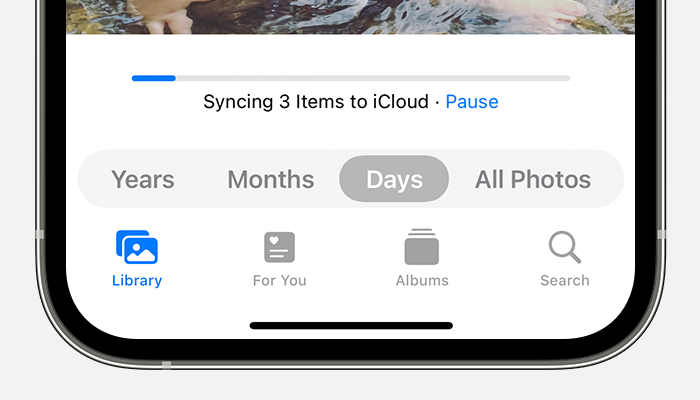
3. Scroll to the bottom to see the status bar.
If it shows paused here, connect your iPhone to power and a strong Wi-Fi network to see if the sync finishes and that your photos now appear as expected.
Let us know what you find.
Take care!
Hey SQ_1234,
Thanks for participating in Apple Support Communities. To be sure we understand, do all of your photos appear this way or only the new photos that you take with your iPhone? If it's all photos, do you use iCloud Photos? To find out, tap Settings > [your name] > iCloud > Photos. If so, let's check the status of your library using these steps: Get help with iCloud Photos - Apple Support
How do I check the status of my uploads or downloads to iCloud Photos?
1. Open the Photos app.
2. Select the Library tab, then tap All Photos.
3. Scroll to the bottom to see the status bar.
If it shows paused here, connect your iPhone to power and a strong Wi-Fi network to see if the sync finishes and that your photos now appear as expected.
Let us know what you find.
Take care!
Iphone 13 Pro Max pictures are white when viewing