Epson Scan 2 Utility Unable to launch after Nov 24 Update

After the November 2024 system update, the Epson Scan Utility fails to launch properly on macOS. When the application is opened, the scanner settings briefly appear but the window immediately disappears without any error message. Uninstalling and reinstalling the latest drivers and software, restarting the system, and verifying the scanner’s connection do not resolve the issue, even though the device is recognised by the system and the MacOs Image Capture Tool recognises the scanner and works (all be it without the additional functionality).

MacBook Pro 16″, macOS 15.2

Posted on Dec 24, 2024 7:30 AM

Reply
Question marked as Top-ranking reply

Posted on Dec 24, 2024 7:40 AM

Resolved: It was the problem was caused by the antivirus software Sophos Home, specifically its ‘Malicious Traffic Detection’ protection. Disabling this feature prevents the scanner settings window from immediately disappearing, allowing the device to be added and configured successfully. However, please note that disabling this protection will cause Sophos to report your machine as vulnerable. You can choose to disable and enable the feature as needed or leave it off if scanning is a priority. The issue has been raised with Sophos for further investigation and resolution.

25 replies
Question marked as Top-ranking reply

Dec 24, 2024 7:40 AM in response to Leon_Yi

Resolved: It was the problem was caused by the antivirus software Sophos Home, specifically its ‘Malicious Traffic Detection’ protection. Disabling this feature prevents the scanner settings window from immediately disappearing, allowing the device to be added and configured successfully. However, please note that disabling this protection will cause Sophos to report your machine as vulnerable. You can choose to disable and enable the feature as needed or leave it off if scanning is a priority. The issue has been raised with Sophos for further investigation and resolution.

Jan 18, 2025 4:52 AM in response to Leon_Yi

Email from Sophos Support:


Thanks for your patience with me on this case. We had a moment to look into this case and it appears that you're affected by the Apple Firewall issue that is affecting many applications since the latest OS update. You can try just disabling the "Enable Stealth Mode" in System Settings and Firewall options to make the program to work. With this disabled, removing the Exception from your Dashboard shouldn't affect the launch, either.


I hope this helps. I look forward to hearing back from you, and please let me know if you run into any trouble following these steps.

Regards,

Jan 6, 2025 12:29 PM in response to Lightwind

All I can suggest is to try completely removing the software and then reinstalling. Then going into 'Privacy & Security' > 'Full Disk Access' and ensure 'Epson Software Update' is enabled. Back out of that and then while still in Privacy & Security' go to 'Local Network' and make sure everything with 'Epson' in the name is enabled. Then give it another shot. Outside of that I'd speak to Epson (P.s. I meant to say previously I'm talking to the Anti-virus vendor not Epson) as the software is working for me as long as the AV is disabled, so I suspect your issue is a config one.

Jan 6, 2025 8:23 AM in response to Leon_Yi

Well, I don't run any AV software other than what is already in macOS Sequoia 15.2, and I have exactly the same problem where the Epson Scan 2 Utility will try to open/connect to scanner, and will then immediately shut down. The scanner and the Epson Scan 2 Utility were working perfectly before the Nov 2024 macOS update. I've updated to the latest Epson scanner drivers, but this does not help. However, I am still able to print to the Epson printer (Epson ET-3750 printer/scanner) using the Epson Print Utility. Looks like there is something in the latest macOS update that could be causing this problem.

Dec 24, 2024 7:59 AM in response to Leon_Yi

If we may ask ?


Exactly what does the user ( you ) believe this Sophos Home AntiVirus Software protecting the computer from ?


There are no known Windows-like Viruses in the wild that self replicate and affect macOS, because of the underling UNIX  Foundation and Permission Limitation. 


The Operating System resides in a Sealed and Read Only Volume that cannot be opened by the User nor by Third Party Applications.


Security. Built right in


Mac app security enhancements


 The Built in Security  is all that is required to protect the computer.


Protecting against malware in macOS


There is Adware & Malware which will affect the computer and is generally downloaded from “ Shady “ Websites or Developers who Inject this software into the download.


From a well written User Tip from @Kurt Lang


What is malware? - Apple Community


Jan 6, 2025 8:31 AM in response to Leon_Yi

I’m aware that macOS is more secure than windows, but historically has not been entirely immune from viruses.

You can't protect yourself from what doesn't exist. There are no Mac viruses. None. Zero. Zip. Nada. Not unless you're referring to OS 9 and earlier.

Antivirus software adds additional protection and peace of mind.

The only thing AV software does is interfere with the operation of the OS and take money from you for zero return.

Jan 6, 2025 8:35 AM in response to Lightwind

I'm using the latest version of macOS on an M4 Pro mini. I don't normally even look at these included Epson apps since I use SilverFast for all of my scanning. But I did launch both Epson Scan 2, and Epson Scan Utility 2 just to check. They both work without issue.


This was also no issue with an M2 Pro mini I recently replaced that was running the same current version of Sequoia.

Jan 6, 2025 10:53 AM in response to Lightwind

Just to be sure, check the specifications of the cable router/modem you're using. The setups vary, though getting either without a built-in firewall is now pretty rare.


You may have a combo modem-router, which is what most are. Or, possibly a modem and router separately.


A modem only is just that. It connects you to your cable (or DSL) service and that's it. These devices typically only have two ports. One for the incoming phone line or coax cable, and an Ethernet WAN port to connect the modem to a separate router with an Ethernet cable. Some cable models skip the incoming port entirely and connect to your service via wireless to the nearest cell tower.


The modem may or may not have a built-in firewall, but often not as they expect you will use a router that does have one between you and the outside world. Connecting a modem only directly to your computer works, but if the modem has no firewall of its own, then you have no choice but to turn the OS firewall on.


The above is not as typical. Most services provide the user with a combo unit. The obvious clue it's also a router is they all have at least two Ethernet LAN ports on them to connect your computer and devices to.


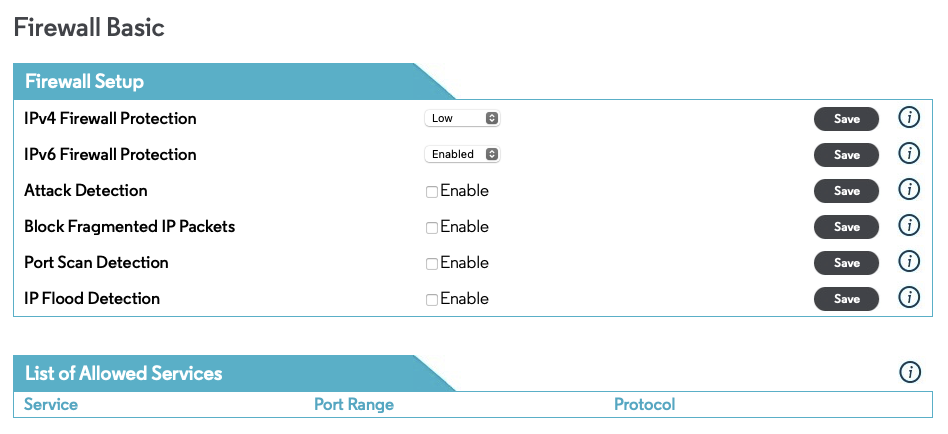
You can also normally access the modem or combo unit settings in your browser. Almost all newer devices have built-in web pages for the settings. Somewhere in there you should find a page for the firewall settings, such as this one for a Motorola compatible modem/router you use with Xfinity/Comcast:


This thread has been closed by the system or the community team. You may vote for any posts you find helpful, or search the Community for additional answers.

Epson Scan 2 Utility Unable to launch after Nov 24 Update

Welcome to Apple Support Community
A forum where Apple customers help each other with their products. Get started with your Apple Account.