Sequoia Calculator Paper Tape Gone?

Just upgraded to Sequoia. Lots of niceness; hooray, blah, blah, blah...


I use the Calculator - all the time; I use the Paper Tape - all the time.


Where did the Paper Tape go?


I see there is now a "Show History" - but it's grayed out when using "Scientific" in "RPN" mode.


Wait; what...?


Is there another toggle / workaround?


Matt

MacBook Pro 14″

Posted on Sep 17, 2024 2:56 PM

Reply
Question marked as Top-ranking reply

Posted on Nov 14, 2024 7:37 AM

This may help with the missing tape on the calc app. I updated to Sequoia and discovered the tape missing. Grr. I always used it to check my entries for errors. I found that View-Show History - gives a truncated list of a long string of entries. But if I right-clicked on that truncated list, it showed the whole thing and also gave me the option of copying. So I could paste and print the tape if I needed it.

97 replies
Question marked as Top-ranking reply

Nov 14, 2024 7:37 AM in response to MattBeef

This may help with the missing tape on the calc app. I updated to Sequoia and discovered the tape missing. Grr. I always used it to check my entries for errors. I found that View-Show History - gives a truncated list of a long string of entries. But if I right-clicked on that truncated list, it showed the whole thing and also gave me the option of copying. So I could paste and print the tape if I needed it.

Dec 3, 2024 10:39 AM in response to MattBeef

It should be noted that built-in apps on any OS are not typically full blown applications. They have always been considered demonstrations of what you can do as a developer. At the same time these tools can be quite useful. It's shame when such tools are further dumbed down.


There are quite a few posts about the changes made to Calculator in Sequoia. The old paper tape is gone in favor of History. Press ⌃ + ⌘ + S or click the View menu and click Show History. There are a few other 'problems' that users have encountered with the updated calculator. It feels like the iPad Calculator was ported to macOS. That was likely due to the new Apple Math features which were apparently built on iPadOS first. Hopefully, Apple will listen to feedback and add back the paper tape and revert the behavior back. Until that happens many users may wish to seek out alternatives.


Spotlight can perform advanced calculations and Notes added Math capabilities. Worth looking into in my opinion.


Apple Spotlight Math

https://www.youtube.com/watch?v=MHGe7PP_ydE


Apple Math Notes

https://www.youtube.com/watch?v=1IPGlt98eOE


⚠︎ RECOMMENDED: There is also the 3rd party PCalc App on the App Store which meets all the same standards as the original Apple macOS Calculator but on steroids with many additional nice to have features. This is what I recommend to those daily users of macOS Calculator unhappy with the changes Apple made to the Calculator App.


If you are a hardcore mathematician you probably aren't using the Calculator app. You'll likely be using a Jupyter notebook, Pluto or Mathematica or Emacs Org-Mode and if you need a quick advanced calculation you might use Emacs Calc.


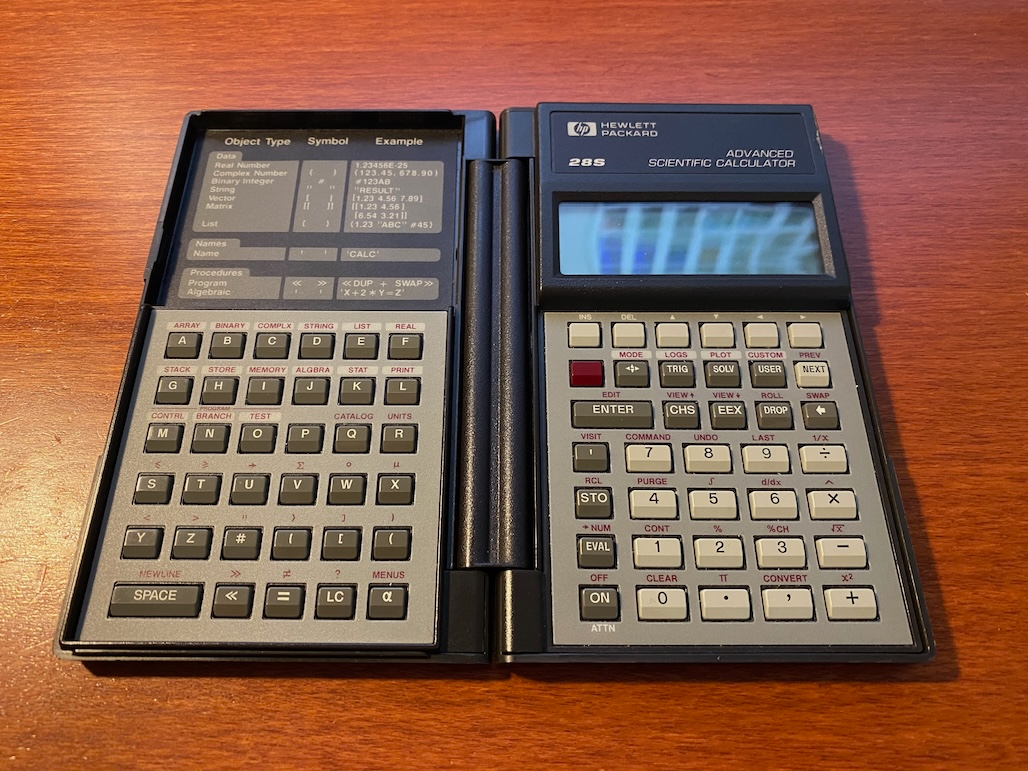
Emacs Calc was heavily influenced by the HP-28S calculator.


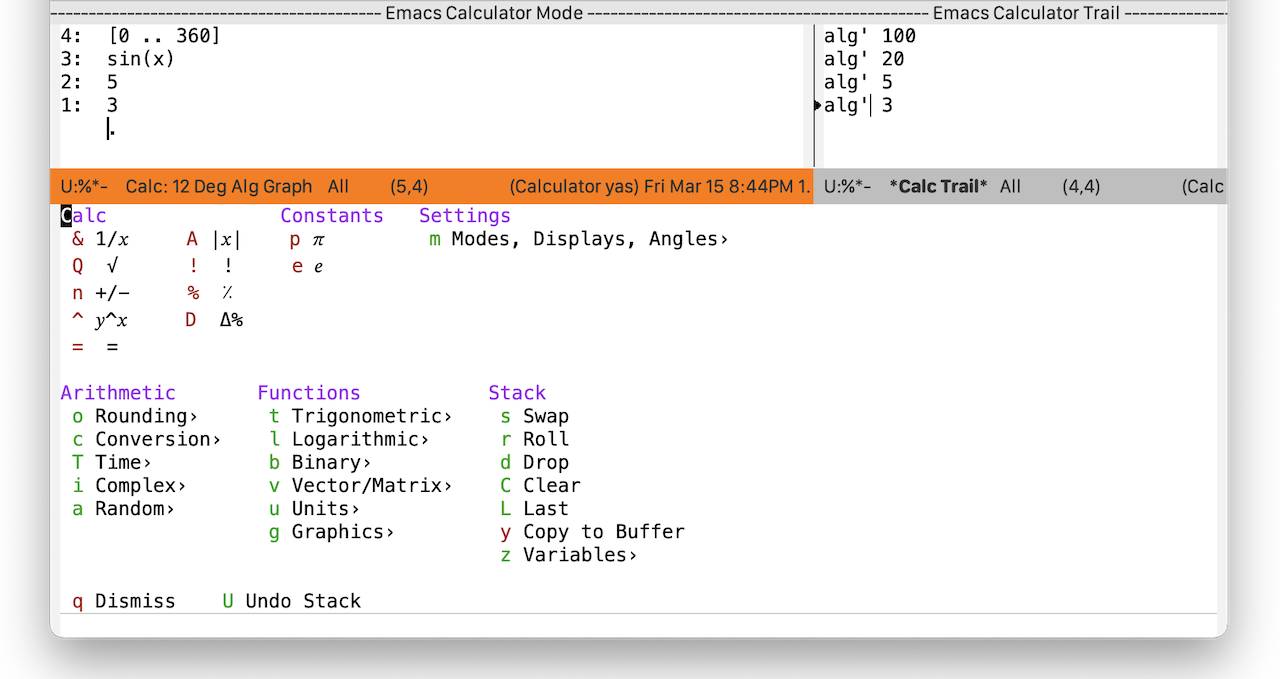
Emacs Calculator screenshot shown below is using the Emacs Casual package to provide the help menu displayed. The author of the Casual packages is building out these transient help screens across several features in Emacs. This is because the keybindings are difficult to remember for infrequently used features. Casual just gives you a quick reference to help you remember.


To be clear, I am not recommending Emacs Calc to novices nor anyone not already versed with Emacs. Emacs is a complicated beast but it is mind-blowing powerful. It is odd and strange because 50 years ago the mouse didn't exist and most keyboards didn't have arrow keys. At the same time, full screen editing was entirely new. Previously you edited line by line on a teletype machine (typewriter connected to mainframe via serial cable). Emacs has continued to evolve and it's been keeping pace with VS Code and other popular editors. The big advantage to Emacs is that you are entirely free to change Emacs behavior yourself. You can change and override EVERYTHING. You make Emacs your own tool to fit your own needs.


History

Emacs used to be built-in on macOS. There are many Emacs keybindings that work all over macOS beyond the Terminal readline interface. This is because macOS Is derived from NeXT and the developers built their next generation OS using Emacs. If you want to try out Emacs, the most favored distribution is Emacs-Plus for macOS. It can be installed via Homebrew. Run through the built-in tutorial a few times as you are learning. Read this beginners guide, consider buying the awesome Mastering Emacs eBook from the same site. Read the built-in Emacs Manual and Introduction to Programming Emacs Lisp. Emacs has some of the best documentation I've ever come across. Elisp is not difficult and MIT department secretaries were doing it 30 years ago and they didn't know it was programming. You don't need to be a programmer nor a math wiz. There are lots of people using Emacs and they are not in a technical field. For example, several authors write all their books in Emacs and have been doing so for decades. Emacs is one heck of a rabbit hole that is worth exploring if one is so inclined. But it does take the commitment of reading and learning and if you can touch type without looking at your hands, you can go extremely fast in Emacs. Emacs is an ongoing continuous learning experience. It's been 40 years and I still discover stuff I didn't know.

Sep 23, 2024 11:35 AM in response to etresoft

“Due to the unusual data entry method used by RPN mode, it's simply not possible to represent, and replay, that in the new user interface. And yes, there might be some "programmer" bias here. We all had to do RPN back in school. And we all hated it. Still do.”


I didn't hate it. I had HP-{12C, 16C, 19B, 35, 45, 67} calculators and used RPN with abandon. 😉


Oct 4, 2024 6:57 AM in response to eduard-z

I don't want to use third party apps
PLEASE bring back the old calculator!


eduard,


Likewise; I don't want to use 3rd-party apps - especially, when Apple was providing just what I needed - and then took it away.


HOWEVER, I must offer this: PCalc (Desktop version for MBP) is FANTASTIC!


I've been using PCalc Lite (on iPhone & iPad) for years - great app.


This screw-up by Apple was just the impetus I needed to go with PCalc for my MBP. Again, FANTASTIC! The only way Apple will get me to go back to their "Calculator" is if they buy PCalc and integrate it into MacOS.


mlg

Sep 23, 2024 11:11 AM in response to MattBeef

The new "History" tab is significantly different than the old "Paper tape".


The paper tape would translate mathematical operations into whatever low-level code was used. So if you type ∛5 in the old version, it is going to show "pow(5, 1/3)" in the paper tape. Yeah, that's kinda the same, but also kinda not. It makes sense to a programmer but maybe not to someone who is just doing the math.


The paper tape is also just what it says - a paper tape. It's just a text representation of all the operations. You can copy the text out and paste it into a web forum perhaps, but that's about all. It's just a big text field.


The new history display is smarter. It is a list of operations. You can click on each one to replay it, seeing exactly what the equation was and the result. You can click on the original equation and change it. If your equation is ∛5, then that is what is represented in the history.


You can even copy an equation to clipboard. Certainly can't do that with the old version.


Due to the unusual data entry method used by RPN mode, it's simply not possible to represent, and replay, that in the new user interface. And yes, there might be some "programmer" bias here. We all had to do RPN back in school. And we all hated it. Still do.

Oct 4, 2024 7:08 AM in response to MattBeef

MattBeef wrote:

Is there another toggle / workaround?


Original Poster, here. I've been monitoring this discussion and have appreciated the input. Some very good.


Best Solution: Get PCalc from the App Store and move on.


BTW, PCalc is FANTASTIC! I'll never go back to MacOS Calculator (unless Apple buys / implements PCalc).


This discussion has been fun, but I'm out. See ya on the next topic.


mlg

Mar 4, 2025 12:33 PM in response to the Kreykes

the Kreykes wrote:

Give us back the paper tape!!

No one here in this user-to-user forum can do that. Apple doesn't read here for feedback or suggestions. However, you can let them know your thoughts here:


Product Feedback - Apple


In the mean time, have you tried the show history setting? View>Show History.


You can also look at other calculator apps in the App Store. PCalc is often recommended.

Nov 15, 2024 9:05 PM in response to MattBeef

I have been using the notes app instead e.g type in

'4427.84+29.4+18+189.13+1.55+45.47+58.88+240+28.5 ='

then enter

the total will appear in yellow' 5,038.77'


if you press enter again it will jump to the next line


it is kind of similar to paper tape in calculator but yes I agree I like the paper tape in calculator more than the history that has replaced as the history is too small so you can't see all the numbers you typed in


hope the above helps

Jan 7, 2025 7:00 AM in response to Joann Kibbe

Joann Kibbe wrote:

I would not have upgraded had I known they would destroy this simple app! Paper Tape was so needed!!

You can let Apple know your thoughts here:


Product Feedback - Apple


Have you tried going to View>Show History? It's not quite the same but it seems to work for some people.


Also, there are lots of calculator apps in the App Store that have always been better than the built in one. PCalc is frequently recommended. It's not free but good software usually isn't.

This thread has been closed by the system or the community team. You may vote for any posts you find helpful, or search the Community for additional answers.

Sequoia Calculator Paper Tape Gone?

Welcome to Apple Support Community
A forum where Apple customers help each other with their products. Get started with your Apple Account.