Mail not working on iPhone after iOS 18 Update

Hi guys,


After updating my iPhone from iOS 17.7 to 18, I encountered an error with my work email. It's showing "IMAP server is not responding."Our mail server uses TLS version 1.1. Does iOS 18 support this version? Can you confirm?


[Re-Titled by Moderator]

iPhone 12, iOS 18

Posted on Sep 16, 2024 10:04 PM

Reply
Question marked as Top-ranking reply

Posted on Sep 17, 2024 8:49 PM

I’d get the server to TLSv1.2 and with forward security configured minimally, and test again.


IMAP (read, receive) and ESMTP (send) are separate network services, so check both.


There are various ways to check the TLS and cipher offers by a server, and curl and testssl among those,:


https://stackoverflow.com/questions/40557031/command-prompt-to-check-tls-version-required-by-a-host


Also check the IMAP and ESMTP server logs for any failure-relevant details that might be included there.

532 replies

Nov 3, 2024 5:28 PM in response to vaughn_NZ

Ok I have ios 18.1 just updated last night. I followed the path you listed above and all I have under advanced settings from top down is:

-a toggle for [Use SSL]

-Move deleted messages into: Deleted Mailbox or Archive Mailbox

-2 choices under S/MIME:

-[Sign] can choose either Yes or N

-[Encrypt by Default] can choose either Yes or No.


There is no field for IMAP Path Prefix under any of my mail settings.

Nov 6, 2024 9:39 AM in response to manojWijesinghe

Hello everyone,

Upgrade from IOS 17.7 to IOS 18.1

I have several IMAP mail accounts. All work well except one, my business account (Zimbra):

Only the sent mailbox is not synchronized when sending from the iPhone (if sending from a Mac, also in IMAP, the sent mailbox of the iPhone is updated).

I've tried everything, nothing works. Do others have the same problem with IOS 18.1?

Nov 6, 2024 10:40 PM in response to manojWijesinghe

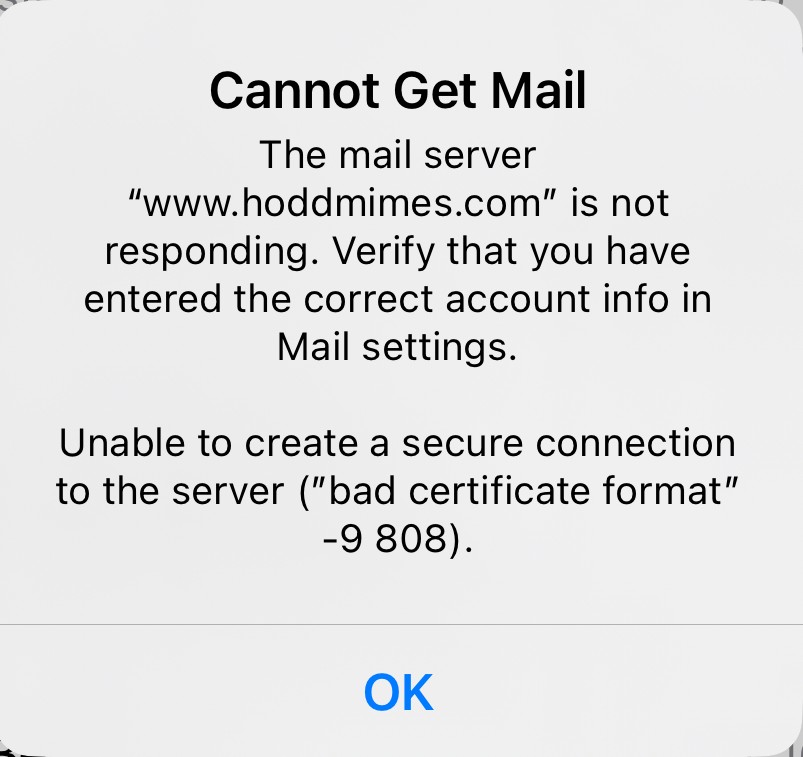
Still have a problem with self signed certificate after upgrading to 18.1

Using sendmail 8.17.1 and dovecot v2.3.20


The mail client error is "Posix 50" and/or "invalid certificate format -9 808"

Delete / added the account multiple times.


Other mail clients works fine, Bluebird (IOS),stock mail MAC Airbook (Sonoma 14.6.1)

Bluebird (Fedora FC40)


here is the essential from the dovecot log (ssl debug)


Nov 07 07:18:17 imap-login: Debug: SSL: where=0x10, ret=1: before SSL initialization

Nov 07 07:18:17 imap-login: Debug: SSL: where=0x2001, ret=1: before SSL initialization

Nov 07 07:18:17 imap-login: Debug: SSL: where=0x2002, ret=-1: before SSL initialization

Nov 07 07:18:17 imap-login: Debug: SSL: where=0x2001, ret=1: before SSL initialization

Nov 07 07:18:17 imap-login: Debug: SSL: where=0x2001, ret=1: SSLv3/TLS read client hello

Nov 07 07:18:17 imap-login: Debug: SSL: where=0x2001, ret=1: SSLv3/TLS write server hello

Nov 07 07:18:17 imap-login: Debug: SSL: where=0x2001, ret=1: SSLv3/TLS write change cipher spec

Nov 07 07:18:17 imap-login: Debug: SSL: where=0x2001, ret=1: TLSv1.3 write encrypted extensions

Nov 07 07:18:17 imap-login: Debug: SSL: where=0x2001, ret=1: SSLv3/TLS write certificate

Nov 07 07:18:17 imap-login: Debug: SSL: where=0x2001, ret=1: TLSv1.3 write server certificate verify

Nov 07 07:18:17 imap-login: Debug: SSL: where=0x2001, ret=1: SSLv3/TLS write finished

Nov 07 07:18:17 imap-login: Debug: SSL: where=0x2001, ret=1: TLSv1.3 early data

Nov 07 07:18:17 imap-login: Debug: SSL: where=0x2002, ret=-1: TLSv1.3 early data

Nov 07 07:18:17 imap-login: Debug: SSL: where=0x2002, ret=-1: TLSv1.3 early data

Nov 07 07:18:17 imap-login: Debug: SSL: where=0x2002, ret=-1: TLSv1.3 early data

Nov 07 07:18:17 imap-login: Debug: SSL: where=0x2002, ret=-1: TLSv1.3 early data

Nov 07 07:18:17 imap-login: Debug: SSL alert: where=0x4004, ret=558: fatal certificate unknown

Nov 07 07:18:17 imap-login: Debug: SSL: where=0x2002, ret=-1: error

Nov 07 07:18:17 imap-login: Debug: SSL error: SSL_accept() failed: error:0A000416:SSL routines::sslv3 alert certificate unknown: SSL

alert number 46


Nov 10, 2024 2:38 PM in response to jackie088

No its not. Adding "/" makes no difference on my iPhone15 Pro. Still no iMAP connection - will move to AirMail. Works perfectly and their Customer Service is first rate. Apple ... writing Software in Mumbai is a disaster. Not only is the Apple Software degraded but Apple's Customer Service to bugs becomes non-existent! What do they do there all day? Drink tea??

Nov 18, 2024 6:23 AM in response to AlWeir

Hello, there are thousands of Apple users who since they updated to IOS 18, the company emails do not load, they do not arrive well, they do not load files as PDF and they have been there for 2 months and they do not provide a solution, regrettable on my part in January I will buy the SAMSUNG S25, because it has never happened to me on IOS and for me it is very necessary that the email works perfectly

Nov 18, 2024 6:25 AM in response to manojWijesinghe

Hello, there are thousands of Apple users who since they updated to IOS 18, the company emails do not load, they do not arrive well, they do not load files as PDF and they have been there for 2 months and they do not provide a solution, regrettable on my part in January I will buy the SAMSUNG S25, because it has never happened to me on IOS and for me it is very necessary that the email works perfectly

Nov 18, 2024 1:04 PM in response to manojWijesinghe

Yahoo Mail -

  1. Mail Does Not Sync all folders IF those the Folders ARE sub folders of the INBOX.
  2. Mail Does Sync all folders IF those the Folders ARE NOT sub folders of the INBOX.


To test this log into your Yahoo mail account in the Web App ( Not Mobile app or iphone )

Note that this does not allow you to create a sub folder of the INBOX.

Try creating a New Folder which will be at the same level as the INBOX, you will note that this fold will appear in Mail on you iphone.


All of my folders that failed to sync in Mail were subfolders of my INBOX.


In the Yahoo Web App, I created a TEMP folder that was at the same level as the INBOX, not sub folders of the INBOX.


Moved the subfolders in the Yahoo Web App to the new TEMP folder.

Recreated the Folders In Needed

Moved the SubFolders to the newly recreated subfolders.


OK it was a lot of work!

I approached it slowly until I understood it and there is a little more to it than the simple instructions above, but you should get the drift. I did a little at time.


Once moved, the folders populated in Mail/IOS18. New emails received today were moved to these folders in Outlook on my PC, were received/populated as well in the folders on my iphone IOS18 on MAIL


Should Mail work without doing this? Absolutely!

Do you want to wait for Yahoo and/or Apple to fix this? No I did not want to wait for some unknown update....

Try it, it might work for you. I'm retired and had time to make the above changes to my yahoo account.


Good Luck,

Nov 21, 2024 11:36 AM in response to manojWijesinghe

Yesterday, I updated to iPadOS 18.1. Today, one of my Gmail accounts stopped retrieving mail. Looking at the email download history, it looks like mail for this account stopped downloading after I updated to iPadOS 18. “No problem“ I thought to myself. “I’ll just delete the account and reinstall it.“ But mail won’t let me add the account. Come on Apple. Fix this problem. Luckily, I have Outlook, an email app that, while clunky, actually works.

Nov 25, 2024 12:34 AM in response to polkamatic

Same with me it’s infuriating why can’t mobile data get this stuff like it used to go it’s exasperating I need to send messages and see what I sent before bug it refuses to down load anything I don’t have wifi access or power to plug into how could such a basic problem happen every update its sone darn headache we rely in these devices it simply isn’t good enough

This thread has been closed by the system or the community team. You may vote for any posts you find helpful, or search the Community for additional answers.

Mail not working on iPhone after iOS 18 Update

Welcome to Apple Support Community
A forum where Apple customers help each other with their products. Get started with your Apple Account.


