How do I fix iCloud photo issues on a second hand MacBook Air?

Hi, recently my MacBook Air 2017 broke down and I bought second hand the same one. When I set it up something went wrong and I set it up with a new user profile. All seemed fine since I had access to iCloud until I tried to export photos from my photo library. Impossible. I looked in the library originals folder and it was empty.

I suspect my photo application on my new second hand Macbook air 2017 uses the library on the user profile of the old one? what to do? thanks!


[Re-Titled by Moderator]

MacBook Air 13″, macOS 12.7

Posted on May 13, 2025 7:47 AM

Reply
Question marked as Top-ranking reply

Posted on May 13, 2025 8:33 AM

Generally we advise not opening and messing around in the Photos Library-- it can irreversibly corrupt the Library.


It's not clear what users you are talking about, or what you're exporting from or to. iCloud? New user? Old user? Are you using "Optimize Storage?"


Photos only shows pictures that are in its local Library--pictures at iCloud must transfer to the local library to be used by Photos. If you see pictures in Photos, you are looking at images that are in a Library on the computer. But there may be more than one Library.


A Library in the Pictures folder owned by User#1 is not available to User#2, and vice versa. If you try to look, you get this:
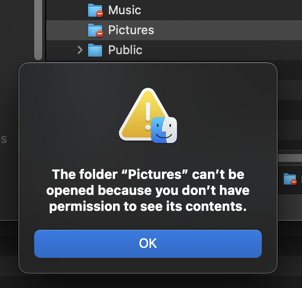
The only way you can even tell if there is a Library in another user's folders is to sign in as that user.


You can see all the Libraries that you do have access to by opening the Library Chooser. Close Photos and Option-click on the Photos icon to get this:
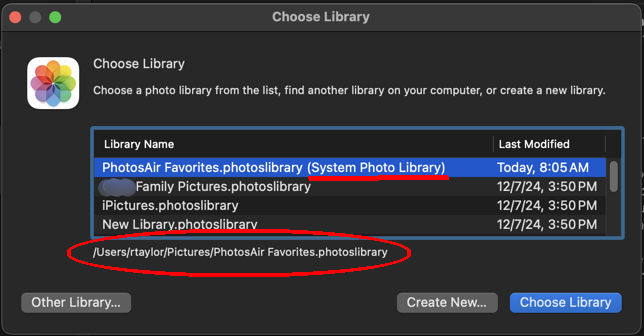
This will show the path to each Library, and it identifies the System Library. If the Library you're using isn't the one you want, you can change it here.


If you can see pictures at iCloud that you don't see in your local Library, then that Library must not be connected to iCloud. If you want the pictures at iCloud.com to be in this Library, then you can check Photos' Settings>General to see if this Library is the System Library-- only the System Library can connect to iCloud:
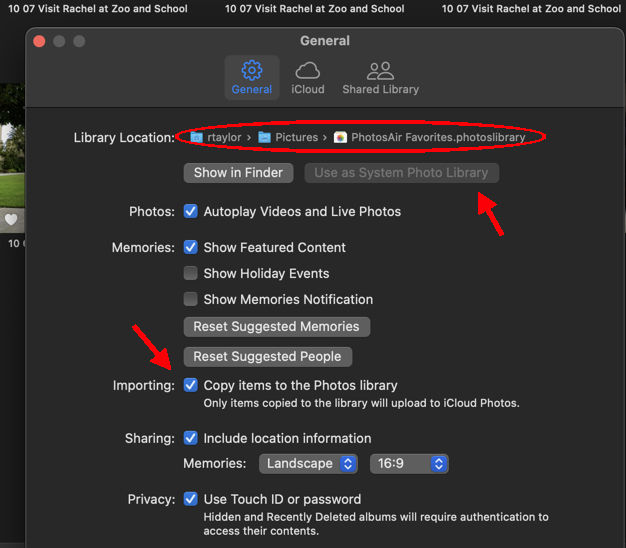
"Use as Photos System LIbrary" is grayed out here, because mine already is.


Then you can check Settings>iCloud to make sure this System Library is connected otherwise iCloud. Once connected, pictures in your local Library will be copied to iCloud.com, and those at iCloud will be copied locally.


Let us know how this is going, and if it's making sense…

1 reply
Question marked as Top-ranking reply

May 13, 2025 8:33 AM in response to Sophie-Marthe

Generally we advise not opening and messing around in the Photos Library-- it can irreversibly corrupt the Library.


It's not clear what users you are talking about, or what you're exporting from or to. iCloud? New user? Old user? Are you using "Optimize Storage?"


Photos only shows pictures that are in its local Library--pictures at iCloud must transfer to the local library to be used by Photos. If you see pictures in Photos, you are looking at images that are in a Library on the computer. But there may be more than one Library.


A Library in the Pictures folder owned by User#1 is not available to User#2, and vice versa. If you try to look, you get this:

The only way you can even tell if there is a Library in another user's folders is to sign in as that user.


You can see all the Libraries that you do have access to by opening the Library Chooser. Close Photos and Option-click on the Photos icon to get this:

This will show the path to each Library, and it identifies the System Library. If the Library you're using isn't the one you want, you can change it here.


If you can see pictures at iCloud that you don't see in your local Library, then that Library must not be connected to iCloud. If you want the pictures at iCloud.com to be in this Library, then you can check Photos' Settings>General to see if this Library is the System Library-- only the System Library can connect to iCloud:

"Use as Photos System LIbrary" is grayed out here, because mine already is.


Then you can check Settings>iCloud to make sure this System Library is connected otherwise iCloud. Once connected, pictures in your local Library will be copied to iCloud.com, and those at iCloud will be copied locally.


Let us know how this is going, and if it's making sense…

This thread has been closed by the system or the community team. You may vote for any posts you find helpful, or search the Community for additional answers.

How do I fix iCloud photo issues on a second hand MacBook Air?

Welcome to Apple Support Community
A forum where Apple customers help each other with their products. Get started with your Apple Account.