I just bought a new iphone 15 pro max and have discovered I am suddenly unable to send text messages on my iMac. Strangely my text messages are sending on my new phone and people are able to respond to them. But on my iMac they will not deliver.

I called Apple Support and they could not help me.

iMac 27″, macOS 11.7

Posted on Oct 25, 2023 8:00 PM

Reply
Question marked as Top-ranking reply

Posted on Oct 26, 2023 3:16 PM

Hi condor1955,


Is it only the SMS text messages or all messages (including iMessages) that are not being delivered from your iMac? If it's only SMS text messages, make sure you still have your iMac selected at Settings > Messages > Text Message Forwarding on your iPhone.


Automatically forward texts to your other devices
1. Make sure that you're signed in to iMessage with the same Apple ID on each device:
* iPhone or iPad: Check the Apple ID shown in Settings > Messages > Send & Receive.
* Mac: Open the Messages app, choose Messages > Settings (or Preferences), then click iMessage. Check the Apple ID shown.
4. On your iPhone, go to Settings > Messages > Text Message Forwarding.
5. If you don't see Text Message Forwarding, go to Settings > Messages. Turn off iMessage, then turn it back on. Tap Send & Receive, tap Use Your Apple ID for iMessage, then sign in with the same Apple ID used on your other devices.
6. Choose which devices can send and receive text messages from your iPhone:
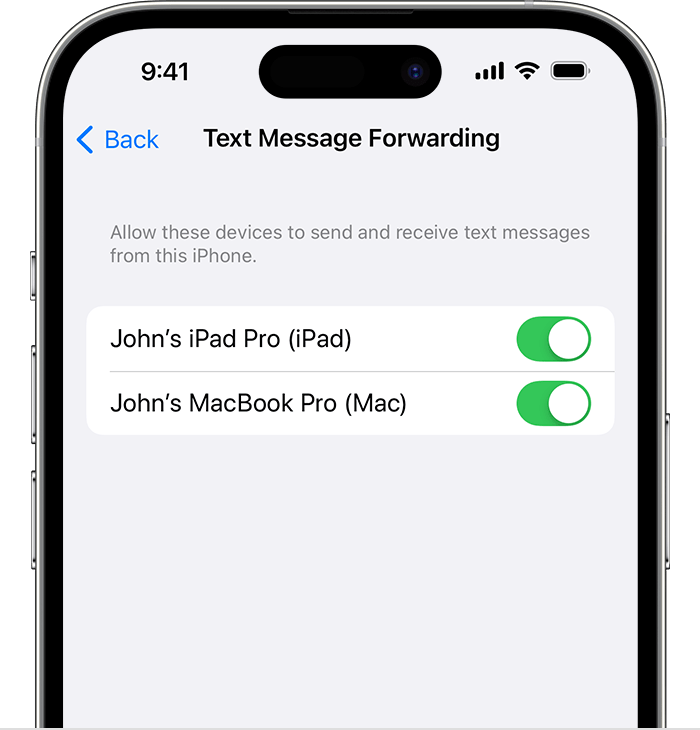
The Text Message Forwarding settting on iPhone
7. If you choose a device that isn't using two-factor authentication for your Apple ID, a verification code appears on each of your other devices: enter that code on your iPhone.

Forward SMS/MMS text messages from your iPhone to your Mac or iPad - Apple Support


If it's with both iMessages and SMS, make sure iMessage is still activated on your iMac. If it deregistered when you set up your new iPhone, you may need to activate it again. The steps outlined here will help:


Regards.



1 reply
Question marked as Top-ranking reply

Oct 26, 2023 3:16 PM in response to condor1955

Hi condor1955,


Is it only the SMS text messages or all messages (including iMessages) that are not being delivered from your iMac? If it's only SMS text messages, make sure you still have your iMac selected at Settings > Messages > Text Message Forwarding on your iPhone.


Automatically forward texts to your other devices
1. Make sure that you're signed in to iMessage with the same Apple ID on each device:
* iPhone or iPad: Check the Apple ID shown in Settings > Messages > Send & Receive.
* Mac: Open the Messages app, choose Messages > Settings (or Preferences), then click iMessage. Check the Apple ID shown.
4. On your iPhone, go to Settings > Messages > Text Message Forwarding.
5. If you don't see Text Message Forwarding, go to Settings > Messages. Turn off iMessage, then turn it back on. Tap Send & Receive, tap Use Your Apple ID for iMessage, then sign in with the same Apple ID used on your other devices.
6. Choose which devices can send and receive text messages from your iPhone:
The Text Message Forwarding settting on iPhone
7. If you choose a device that isn't using two-factor authentication for your Apple ID, a verification code appears on each of your other devices: enter that code on your iPhone.

Forward SMS/MMS text messages from your iPhone to your Mac or iPad - Apple Support


If it's with both iMessages and SMS, make sure iMessage is still activated on your iMac. If it deregistered when you set up your new iPhone, you may need to activate it again. The steps outlined here will help:


Regards.



This thread has been closed by the system or the community team. You may vote for any posts you find helpful, or search the Community for additional answers.

I just bought a new iphone 15 pro max and have discovered I am suddenly unable to send text messages on my iMac. Strangely my text messages are sending on my new phone and people are able to respond to them. But on my iMac they will not deliver.

Welcome to Apple Support Community
A forum where Apple customers help each other with their products. Get started with your Apple Account.