How to turn up volume of phone call in hearing aide
I have tried all the hearing aide settings with no luck. When I am on the phone I. Can barely hear the call in my hearing aide.
I have tried all the hearing aide settings with no luck. When I am on the phone I. Can barely hear the call in my hearing aide.
Hello ttmillers,
Thanks for reaching out to Apple Support Communities. We see you have some questions about your hearing aides, and the volume with your iPhone, and we'd like to help. We also see you came from a great article about this, as well. Taking a look at that resource: Use Made for iPhone hearing devices - Apple Support, you may want to take the following steps:
Control your MFi hearing device
You can use your Apple device to select environment presets adjust the volume, turn on Live Listen, and more. To control your hearing device, use Settings or the Accessibility Shortcut.
Set preferences for features that you control with your Apple device by going to Settings > Accessibility > Hearing Devices. Then tap your hearing device.
* Play Ringtones: You can play ringtones through connected hearing devices.
* Audio Routing: Choose the default device for audio playback from the following options.
* Auto: The last connected device will play audio.
* Always: This hearing device will always play audio.
* Never: This hearing device will not play audio unless you select it.
* Control Nearby Devices: Use your Apple device to adjust the settings of hearing devices that are on the same Wi-Fi network and connected to your iCloud account.
* Audio Handoff: Continue listening to media through your hearing device when you switch between your Apple devices. For example, if your hearing device is connected to your iPhone but you start watching a movie on your iPad, the hearing device automatically switches to the iPad.
* Control on Lock Screen: Quickly make preset and volume adjustments on your hearing device right from the Lock Screen with the Accessibility Shortcut or Control Center hearing button.
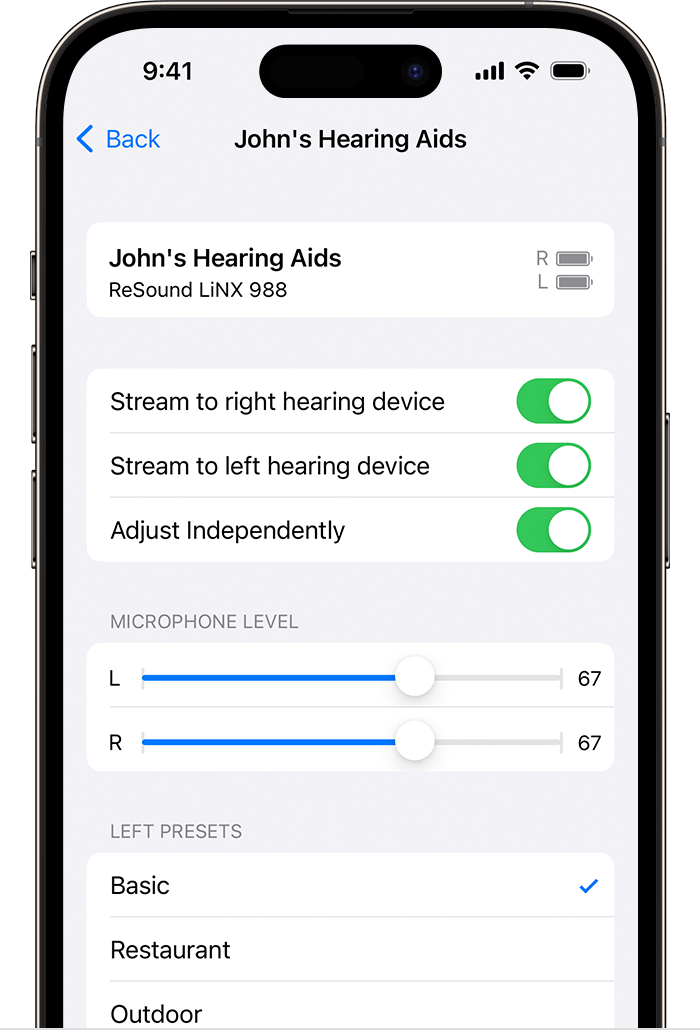
You can also tap your hearing device's name in Settings to:
* View connection status
* Adjust volume levels for either or both hearing devices
* Choose an audio preset
* Turn on Live Listen
* Unpair your hearing device
If you still need help, we'd recommend reaching out to our Accessibility Team: Accessibility Support - Official Apple Support
Regards.
Hello ttmillers,
Thanks for reaching out to Apple Support Communities. We see you have some questions about your hearing aides, and the volume with your iPhone, and we'd like to help. We also see you came from a great article about this, as well. Taking a look at that resource: Use Made for iPhone hearing devices - Apple Support, you may want to take the following steps:
Control your MFi hearing device
You can use your Apple device to select environment presets adjust the volume, turn on Live Listen, and more. To control your hearing device, use Settings or the Accessibility Shortcut.
Set preferences for features that you control with your Apple device by going to Settings > Accessibility > Hearing Devices. Then tap your hearing device.
* Play Ringtones: You can play ringtones through connected hearing devices.
* Audio Routing: Choose the default device for audio playback from the following options.
* Auto: The last connected device will play audio.
* Always: This hearing device will always play audio.
* Never: This hearing device will not play audio unless you select it.
* Control Nearby Devices: Use your Apple device to adjust the settings of hearing devices that are on the same Wi-Fi network and connected to your iCloud account.
* Audio Handoff: Continue listening to media through your hearing device when you switch between your Apple devices. For example, if your hearing device is connected to your iPhone but you start watching a movie on your iPad, the hearing device automatically switches to the iPad.
* Control on Lock Screen: Quickly make preset and volume adjustments on your hearing device right from the Lock Screen with the Accessibility Shortcut or Control Center hearing button.
You can also tap your hearing device's name in Settings to:
* View connection status
* Adjust volume levels for either or both hearing devices
* Choose an audio preset
* Turn on Live Listen
* Unpair your hearing device
If you still need help, we'd recommend reaching out to our Accessibility Team: Accessibility Support - Official Apple Support
Regards.
Hey ttmillers,
Got it. Since the behavior continues, we recommend reaching out to the hearing aid manufacturer's and Apple Support's Accessibility team as mentioned previously.
Thanks for using Apple Support Communities.
Take care!
I have tried all these methods. No luck. The audio on other features like music or video works fine. It is only phone calls I cannot hear. It’s frustrating. I had an iPhone 10 and it worked, so it can’t be my hearing aides has an issue.
How to turn up volume of phone call in hearing aide