a2251 crashing on wake
Hi, my macbook a2251 is crashing after i close the lid and open it after ~1 min. After it restarts, i have this report. any way to fix?
MacBook Pro (2017 – 2020)
Hi, my macbook a2251 is crashing after i close the lid and open it after ~1 min. After it restarts, i have this report. any way to fix?
MacBook Pro (2017 – 2020)
Hi amy0107,
Resetting the SMC can help with unexpected power issues for Macbook.
"The SMC is responsible for managing power on your Mac. Resetting it can resolve certain uncommon issues related to power or thermal management.
Do you need to reset the SMC?
You almost certainly don't need to reset the SMC, but resetting the SMC is sometimes suggested for Intel-based Mac computers as a final step to resolve issues that could be power related:
If you have a Mac with Apple silicon
Find out if you have a Mac with Apple silicon
Make sure that your Mac is plugged into power. Then either restart it or shut it down and turn it on again. No other steps are necessary for Mac computers with Apple silicon.
If you have a Mac with the T2 chip
Find out if you have a Mac with the Apple T2 Security Chip
Laptop computer with the T2 chip
Before resetting the SMC, follow these steps:
If the issue persists, reset the SMC:
 on the left side of your keyboard
 on the left side of your keyboard
 on the right side of your keyboard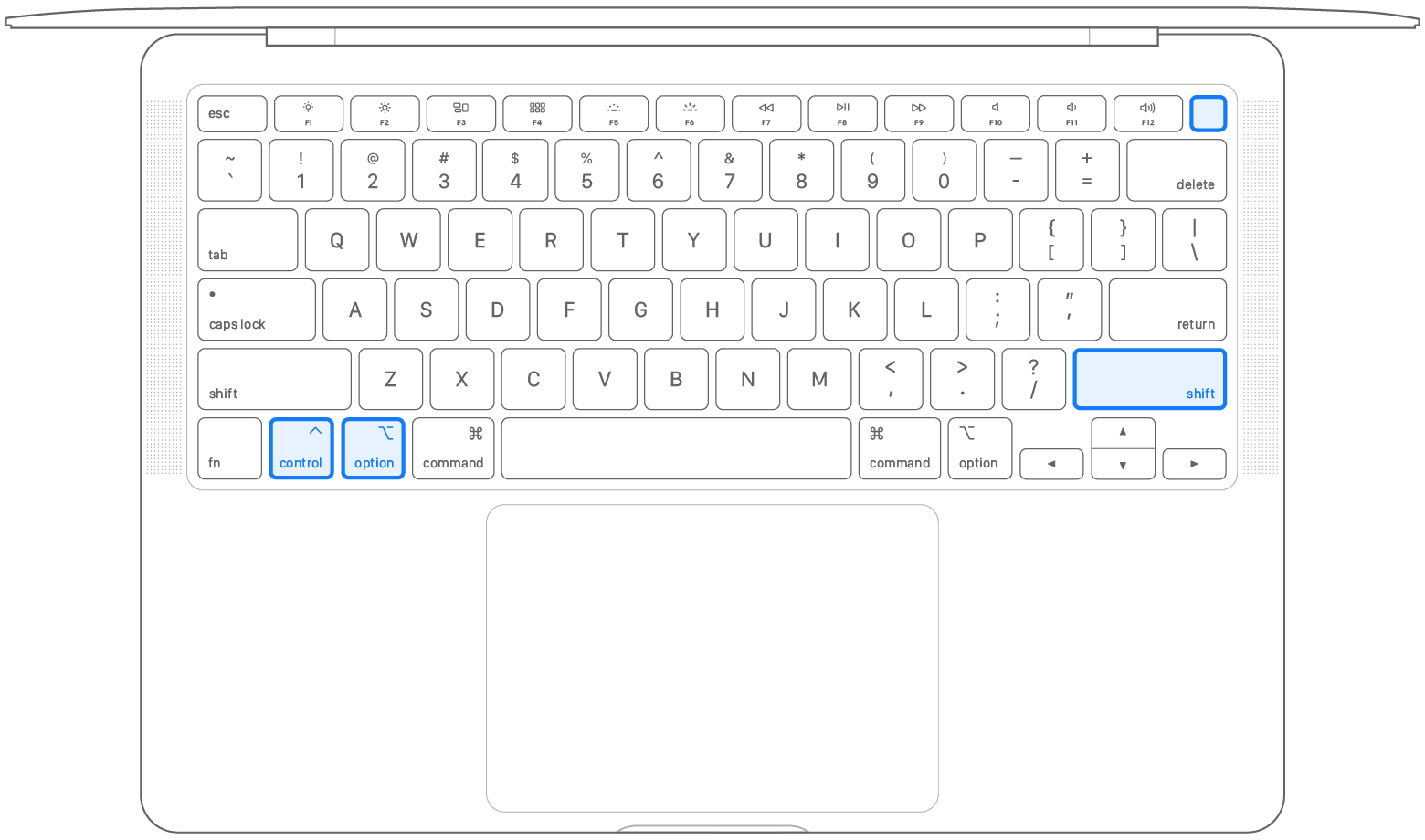
If you need help, contact Apple Support.
Desktop computer with the T2 chip
If your Mac isn't a laptop computer, follow these steps:
If you need help, contact Apple Support.
If you don't have a Mac with Apple silicon or the T2 chip
Follow these steps on older computers that have neither Apple silicon nor the Apple T2 Security Chip.
Laptop computer
on the left side of your keyboard on the left side of your keyboard on the left side of your keyboard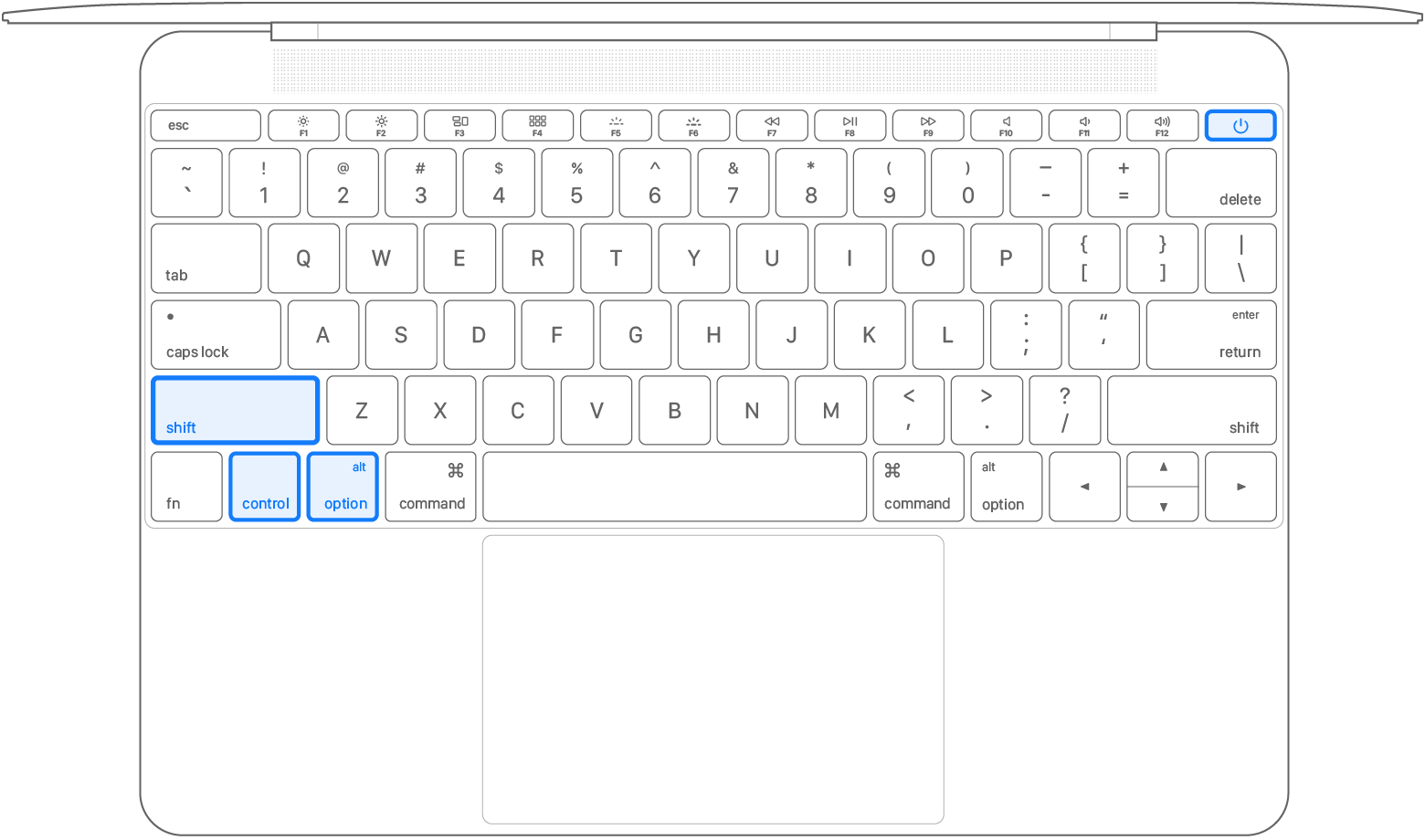
If you need help, contact Apple Support.
Desktop computer
If your Mac isn't a laptop computer, follow these steps:
If you need help, contact Apple Support. "
Cheers.
Hi amy0107,
Resetting the SMC can help with unexpected power issues for Macbook.
"The SMC is responsible for managing power on your Mac. Resetting it can resolve certain uncommon issues related to power or thermal management.
Do you need to reset the SMC?
You almost certainly don't need to reset the SMC, but resetting the SMC is sometimes suggested for Intel-based Mac computers as a final step to resolve issues that could be power related:
If you have a Mac with Apple silicon
Find out if you have a Mac with Apple silicon
Make sure that your Mac is plugged into power. Then either restart it or shut it down and turn it on again. No other steps are necessary for Mac computers with Apple silicon.
If you have a Mac with the T2 chip
Find out if you have a Mac with the Apple T2 Security Chip
Laptop computer with the T2 chip
Before resetting the SMC, follow these steps:
If the issue persists, reset the SMC:
on the left side of your keyboard on the left side of your keyboard on the right side of your keyboardIf you need help, contact Apple Support.
Desktop computer with the T2 chip
If your Mac isn't a laptop computer, follow these steps:
If you need help, contact Apple Support.
If you don't have a Mac with Apple silicon or the T2 chip
Follow these steps on older computers that have neither Apple silicon nor the Apple T2 Security Chip.
Laptop computer
on the left side of your keyboard on the left side of your keyboard on the left side of your keyboardIf you need help, contact Apple Support.
Desktop computer
If your Mac isn't a laptop computer, follow these steps:
If you need help, contact Apple Support. "
Cheers.
a2251 crashing on wake