How to resolve iMessage syncing issue between iPhone 15, iMac, and iPad after October update?

iphone 15 iMessages not syncin with imac and ipad apple called they could not helped me. Notice that this happened after the update about October 17 or 18th.


[Re-Titled by Moderator]

Original Title: Syncing Issue

iPad, iPadOS 18

Posted on Dec 2, 2025 6:14 AM

Reply
2 replies

Dec 2, 2025 7:39 AM in response to Cyrisse125

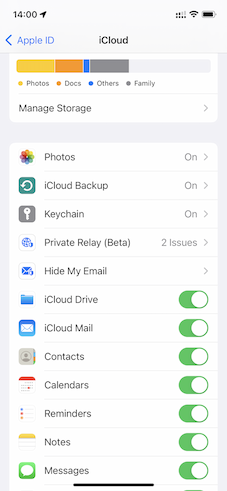
These do not sync between devices. Photos, Notes, Reminders, Messages, etc.


Enabling iCloud for various functionalities such as Photos, Notes, Reminders, Messages, and more, as illustrated in the accompanying image, facilitates the seamless synchronization of each of these elements with iCloud through the internet.


If one of the devices is not connected to the internet then it may seem to you that they are not syncing. This link could assist you in pinpointing internet issues, a crucial step for synchronization. Internet not available WiFi and Cellular … - Apple Community


Note: If you delete any or all data from one device, it will also be removed from iCloud and all other devices linked to the same Apple ID. Likewise, the reverse is true as well.



Similarly...


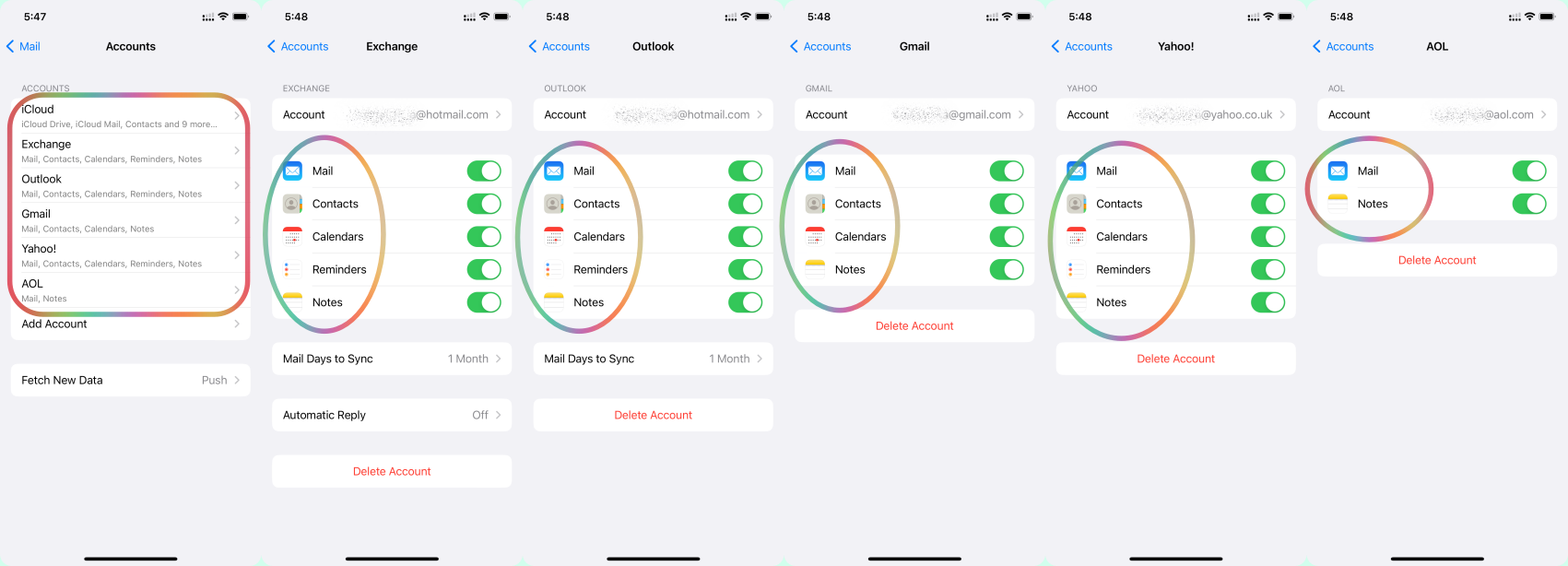
These don't sync between devices Contacts, Calendars, Bookmarks, Notes, Voice Memosshared photosiCloud Photos, and emails. Each device syncs to the email account server which may be Google, iCloud, AOL, Exchange, Outlook, Yahoo, or any Other. Please see the pic below.


For Audiobooks, iMovie Project, and Apple Podcast log in with the same Apple ID as used in your Mac


If one of the devices is not connected to the internet then it may seem to you that they are not syncing. This link could assist you in pinpointing internet issues, a crucial step for synchronization. Internet not available WiFi and Cellular … - Apple Community


Dec 2, 2025 7:38 AM in response to Cyrisse125

It's not always the iOS update's fault!  Many things can cause phone problems.  If you tell people you think it's an iOS update, it might make it harder to fix or find a solution for the real issue.


Remember, the right question often leads to the solution!


Was/Is your device Jailbroken? If that's the situation, please be informed that attributing the issues to iOS updates may not be accurate.


iOS updates aim to enhance user experience, boost security, and fix bugs rather than disrupt core features. The majority of the issues after updates might stem from underlying, unmentioned factors. Updates won't typically alter personal data but may refine settings or features. Backup before major updates for safety. Review Apple's update details and backup advice for a smooth process.


Kindly consider checking your settings and addressing any device issues before attributing the issue to external factors. This could be a pure coincidence that the iOS update affected the iPhone functions.


Before initiating a standard iOS update, it's advisable to create a backup. Have you completed this step? If yes, proceed with the restoration from the backup.


See what each update does: OS — iOS 26, About iOS 18 Updates, About iOS 17 Updates, About iOS 16 Updates, About iOS 15 Updates, About iOS 14 Updates, About iOS 13 Updates, About iOS 12 Updates, and so on...


How to resolve iMessage syncing issue between iPhone 15, iMac, and iPad after October update?

Welcome to Apple Support Community
A forum where Apple customers help each other with their products. Get started with your Apple Account.