Low volume on alerts/text messages

The ringtone volume of my iPad Pro 12.9" 6th gen is about twice that of any of the other tones (Text Tone, New Mail, Sent Mail, etc). If I set the ring tone to a comfortable level, it makes it hard to heard any of the other tones.


Updating to 16.3.1 made no difference.


This is maddening! When can a fix be expected? This is my first experience with an Apple product and I have to say it has NOT been a terribly pleasant one, overall.

iPad Pro, 12.9-inch, 6th Gen, Wi-Fi

Posted on Feb 15, 2023 6:54 PM

Reply
Question marked as Top-ranking reply

Posted on Feb 16, 2023 8:47 AM

You are not the first - and are unlikely to be the last - to observe that notification (Alert) sounds seemingly have a much lower volume that other system audio. This complaint appears most common with recent models of iPad Pro; this is not to suggest that this is a common issue, but is most commonly made by owners of these models.


The tags appended to your post suggest that you have a sixth generation iPad Pro 12.9”. For what it’s worth, I see exactly the same with a fifth generation iPad Pro 12.9”.


You can increase the volume of Alert sounds by adjusting the iPad’s Ringtone & Alerts volume slider:

Settings > Sounds
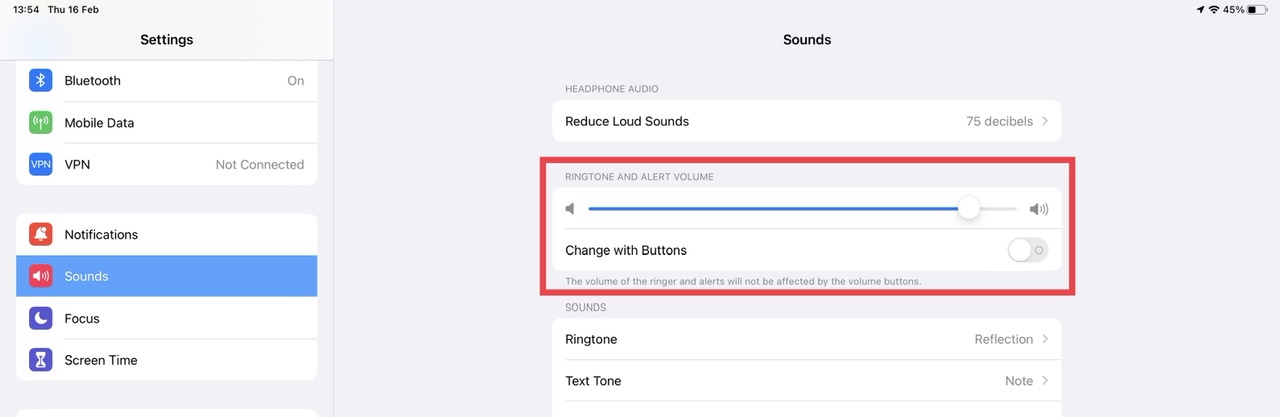


You may find that you have more consistent control of your system audio by ensuring that Change with Buttons is disabled - as shown above.


You are likely to find that the Ringtone & Alerts volume will need to be adjusted to the higher end of the scale - at which time the ringer will be very loud when compared to the other audible alerts.


You may wish to submit a bug-report via Apple’s Product Feedback portal. For iPad and iPadOS:

Feedback - iPad - Apple


When submitting your report, be sure to include the model details in the body section of the report - as the pick-list may is often not up-to-date with current models. Every submitted report counts; until a sufficient number 0f reports are received, Apple may not assign resources to investigate and resolve the issue.

1 reply
Question marked as Top-ranking reply

Feb 16, 2023 8:47 AM in response to BaconIsABasicHumanRight

You are not the first - and are unlikely to be the last - to observe that notification (Alert) sounds seemingly have a much lower volume that other system audio. This complaint appears most common with recent models of iPad Pro; this is not to suggest that this is a common issue, but is most commonly made by owners of these models.


The tags appended to your post suggest that you have a sixth generation iPad Pro 12.9”. For what it’s worth, I see exactly the same with a fifth generation iPad Pro 12.9”.


You can increase the volume of Alert sounds by adjusting the iPad’s Ringtone & Alerts volume slider:

Settings > Sounds


You may find that you have more consistent control of your system audio by ensuring that Change with Buttons is disabled - as shown above.


You are likely to find that the Ringtone & Alerts volume will need to be adjusted to the higher end of the scale - at which time the ringer will be very loud when compared to the other audible alerts.


You may wish to submit a bug-report via Apple’s Product Feedback portal. For iPad and iPadOS:

Feedback - iPad - Apple


When submitting your report, be sure to include the model details in the body section of the report - as the pick-list may is often not up-to-date with current models. Every submitted report counts; until a sufficient number 0f reports are received, Apple may not assign resources to investigate and resolve the issue.

This thread has been closed by the system or the community team. You may vote for any posts you find helpful, or search the Community for additional answers.

Low volume on alerts/text messages

Welcome to Apple Support Community
A forum where Apple customers help each other with their products. Get started with your Apple Account.