You are not the first - and are unlikely to be the last - to observe that notification (Alert) sounds seemingly have a much lower volume that other system audio. This complaint appears most common with recent models of iPad Pro; this is not to suggest that this is a common issue, but is most commonly made by owners of these models.
The tags appended to your post suggest that you have a sixth generation iPad Pro 12.9”. For what it’s worth, I see exactly the same with a fifth generation iPad Pro 12.9”.
You can increase the volume of Alert sounds by adjusting the iPad’s Ringtone & Alerts volume slider:
Settings > Sounds
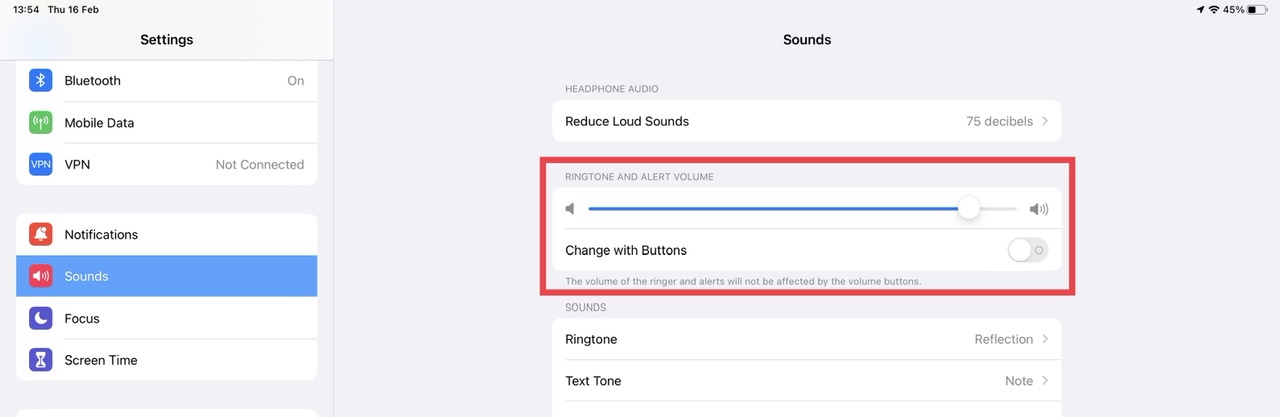
You may find that you have more consistent control of your system audio by ensuring that Change with Buttons is disabled - as shown above.
You are likely to find that the Ringtone & Alerts volume will need to be adjusted to the higher end of the scale - at which time the ringer will be very loud when compared to the other audible alerts.
You may wish to submit a bug-report via Apple’s Product Feedback portal. For iPad and iPadOS:
Feedback - iPad - Apple
When submitting your report, be sure to include the model details in the body section of the report - as the pick-list may is often not up-to-date with current models. Every submitted report counts; until a sufficient number 0f reports are received, Apple may not assign resources to investigate and resolve the issue.

