Incoming WhatsApp call
When an incoming WhatsApp call is made on an Apple Iwatch, nothing happens, there are no call notifications. But as soon as the call becomes missed, a missed call notification arrives.
Apple Watch SE
When an incoming WhatsApp call is made on an Apple Iwatch, nothing happens, there are no call notifications. But as soon as the call becomes missed, a missed call notification arrives.
Apple Watch SE
Hello nimesh128,
It seems like you're experiencing an issue receiving notifications for incoming calls from the WhatsApp application, is that correct? Do you experience issues with any other applications, or just that one? That information will help us plan how to proceed.
If you're not receiving notifications as expected, please check out the information in this link to help ensure notifications are configured correctly, so we can make sure there's no issue there: Change notification settings on Apple Watch
Change notification settings directly on Apple Watch
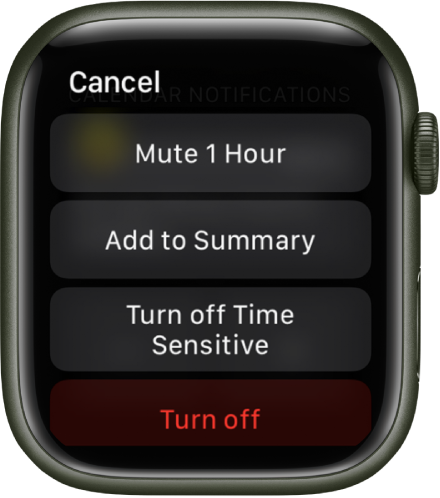
You can manage other notifications preferences directly on your Apple Watch by swiping left on a notification and tapping. Options may include:
• Mute 1 hour or Mute for Today: For the next hour or for the rest of the day, notifications are sent directly to Notification Center without your Apple Watch making a sound or displaying the notification. To see and hear these notification alerts again, swipe left on a notification, tap
• Add to Summary: Future notifications from the app appear in the Notification Summary on your iPhone.
To have the app once again notify you immediately, open the Settings app on your iPhone, tap Notifications, tap the app, then tap Immediate Delivery.
• Turn off Time Sensitive: Time-sensitive notifications are always delivered immediately, even if you’re using a Focus that delays most notifications. However, if you want to prevent this app from delivering even time-sensitive notifications immediately, tap this option.
• Turn off: The app sends no notifications. To reenable notifications from the app, open the Apple Watch app on your iPhone, tap My Watch, tap Notifications, tap the app you want to adjust, then tap Allow Notifications.
If you continue to experience an issue with WhatsApp, and the issue only happens with that application, we would suggestion contacting the developer for further assistance. This link outlines how to contact an app developer and may help: How to contact an app developer
Thanks!
Hey nimesh128,
Since this is isolated to that application, we would suggestion contacting the developer for further assistance. This link outlines how to contact an app developer and may help: How to contact an app developer
Take care.
Only for the WhatsApp call. others are working correctly.
Incoming WhatsApp call