battery running out of power quickly since updating to 16.5 OS

battery running out of power quickly since updating to 16.5 OS. My device is an iPad (eighth generation) presently running on OS 16.5.


I've been noticing that since I updated to 16.5 OS, My ipad has needs to be charged frequently - (especially after using zoom). Suddenly I need to charge after a half day or less of use which has never happened before. I recently posted about another issue that came up after the 16.5 update which is that I am not able to use my Apple Lightening to USB3 Camera Adapter. It is evident now that the quickly depleting batter began also right after the 16.5 update. It seems like 16.5 is causing power issues. Has anyone else been experiencing this? Thanks.


iPad (8th generation)

Posted on Jun 16, 2023 8:10 PM

Reply
Question marked as Top-ranking reply

Posted on Jun 18, 2023 5:00 AM

Higher than usual battery utilisation is expected to occur for some hours, or possibly days, after performing a system software update. After updating, many background housekeeping processes will be running - including reindexing the file system. Nominal battery utilisation can be expected to return within a few days.


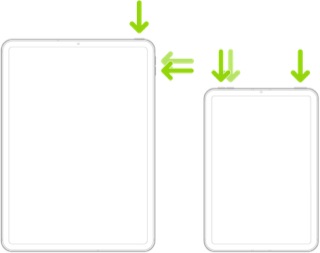
If you are experiencing very high battery utilisation, a process may have stalled. A forced-restart will usually clear a stuck/stalled process. To restart your iPad:


  • On an iPad with a Home button: Press and hold the top button and the Home button at the same time. When the Apple logo appears, release both buttons.



  • On an iPad with Face ID: Press and quickly release the volume up button, press and quickly release the volume down button, then press and hold the top button. When the Apple logo appears, release the button.


If the problems persists, you might be well advised to seek assistance to seek from Apple Support - and request a remote diagnostic test. You can contact the Support Team using the Support link at top-right or bottom-left of this page. 


Alternatively, you can initiate and manage your support cases using the excellent Apple Support App. If not already installed on your iPad, the App can be downloaded from the App Store:

https://apps.apple.com/gb/app/apple-support/id1130498044


You might also visit the Genius Bar at your local Apple Store or Apple Authorised Service Provider (AASP) - where the technicians will be able to test and assess your iPad:

Genius Bar Reservation and Apple Support Options - Apple


Subsequent to the iOS/iPadOS 16.5 update, there is an issue with charging the iPad from USB Type-A Power Adapters, via the USB3 Camera Adapter - regardless of the Power Adapter’s power output.


The current workaround, pending a software update to fix the issue, is to use an Apple 20W USB-C Power Adapter with a USB-C to Lightning charging cable.



1 reply
Question marked as Top-ranking reply

Jun 18, 2023 5:00 AM in response to ateeeate

Higher than usual battery utilisation is expected to occur for some hours, or possibly days, after performing a system software update. After updating, many background housekeeping processes will be running - including reindexing the file system. Nominal battery utilisation can be expected to return within a few days.


If you are experiencing very high battery utilisation, a process may have stalled. A forced-restart will usually clear a stuck/stalled process. To restart your iPad:


  • On an iPad with a Home button: Press and hold the top button and the Home button at the same time. When the Apple logo appears, release both buttons.


  • On an iPad with Face ID: Press and quickly release the volume up button, press and quickly release the volume down button, then press and hold the top button. When the Apple logo appears, release the button.


If the problems persists, you might be well advised to seek assistance to seek from Apple Support - and request a remote diagnostic test. You can contact the Support Team using the Support link at top-right or bottom-left of this page. 


Alternatively, you can initiate and manage your support cases using the excellent Apple Support App. If not already installed on your iPad, the App can be downloaded from the App Store:

https://apps.apple.com/gb/app/apple-support/id1130498044


You might also visit the Genius Bar at your local Apple Store or Apple Authorised Service Provider (AASP) - where the technicians will be able to test and assess your iPad:

Genius Bar Reservation and Apple Support Options - Apple


Subsequent to the iOS/iPadOS 16.5 update, there is an issue with charging the iPad from USB Type-A Power Adapters, via the USB3 Camera Adapter - regardless of the Power Adapter’s power output.


The current workaround, pending a software update to fix the issue, is to use an Apple 20W USB-C Power Adapter with a USB-C to Lightning charging cable.


This thread has been closed by the system or the community team. You may vote for any posts you find helpful, or search the Community for additional answers.

battery running out of power quickly since updating to 16.5 OS

Welcome to Apple Support Community
A forum where Apple customers help each other with their products. Get started with your Apple Account.