Hello S3wdT,
Thanks for posting in the Apple Support Communities. We're happy to look into this with you.
When did you first notice this issue? Was it after installing this iOS or a previous version? Have you tried creating a new Lock Screen with this feature added to see if it still occurs? If you haven't tried that, it's a great way to help isolate the issue to either the wallpaper, feature, or software.
If you haven't checked when using a different Lock Screen wallpaper, try that now and see how it goes.
Personalize your iPhone Lock Screen - Apple Support
Create a custom Lock Screen
1. Touch and hold the Lock Screen until the Customize button appears at the bottom of the screen.
If the Customize button doesn’t appear, touch and hold the Lock Screen again, then enter your passcode.
2. Tap  at the bottom of the screen.
The Lock Screen wallpaper gallery appears.
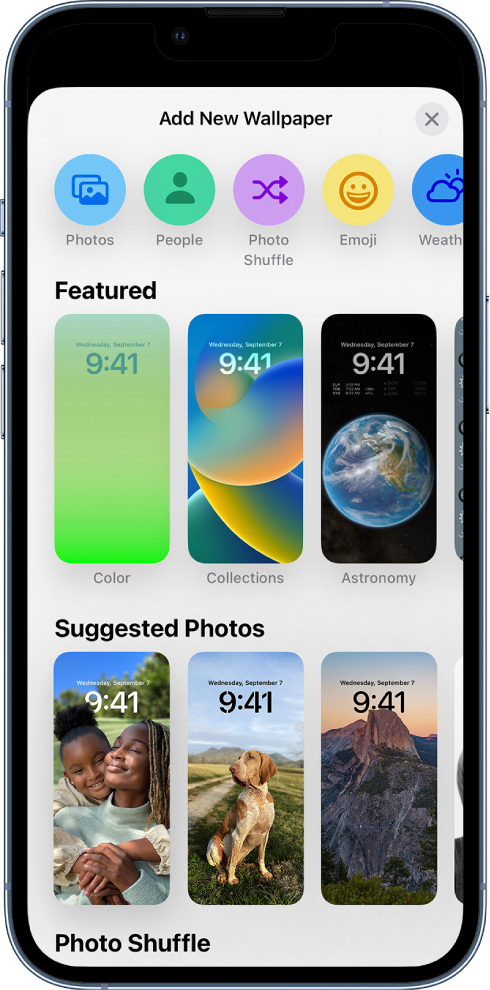
3. Tap one of the wallpaper options to select it as your Lock Screen.
For some wallpaper choices, you can swipe left or right to try different color filters, patterns, and fonts that complement each other.
4. Tap Add, then do one of the following:
- Choose whether to use the wallpaper on both the Lock Screen and Home Screen: Tap Set as Wallpaper Pair.
- Make further changes to the Home Screen: Tap Customize Home Screen. Tap a color to change the wallpaper color, tap  to use a custom photo, or select Blur to blur the wallpaper so the apps stand out.
Best regards.