
Printing from iphone

I have an iPhone 8, until very recently if I recurved an email with an attachment that I wanted to print, if I tapped the little box with the arrow at the top icon. I had the option to print directly from there. This print option has now disappeared and I’m finding it impossible to print from my phone. Why?

iPhone 8, iOS 13

Posted on Oct 30, 2019 10:52 AM

Reply
Question marked as Top-ranking reply

Posted on Oct 30, 2019 11:22 AM

The Print option has moved to a different place in the list on iOS 13.


In particular, scroll down through the list of actions below the row of icons, and you should find the Print option:


5 replies

Oct 30, 2019 11:02 AM in response to Scooby2452

Print with AirPrint

  1. Open the app that you want to print from.
  2. To find the print option, tap the app’s share icon —  or  — or tap .
  3. Scroll down and tap  or Print. If you can’t find the print option, check the app’s User Guide or Help section. Not all apps support AirPrint.
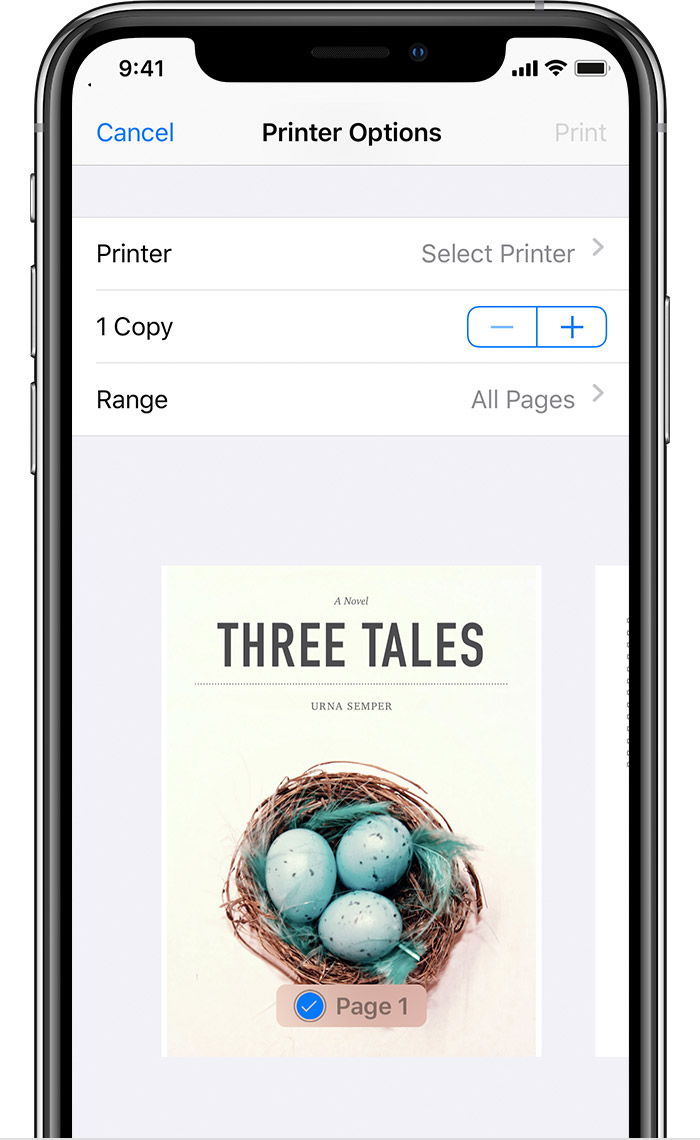
  4. Tap Select Printer and choose an AirPrint-enabled printer
  5. Choose the number of copies or other options, like which pages you want to print.
  6. Tap Print in the upper-right corner.


This thread has been closed by the system or the community team. You may vote for any posts you find helpful, or search the Community for additional answers.

Printing from iphone

Welcome to Apple Support Community
A forum where Apple customers help each other with their products. Get started with your Apple Account.
